Dating profile photos
Tinder Dog Pics: How to Use Your Dog (Without Being That Guy)
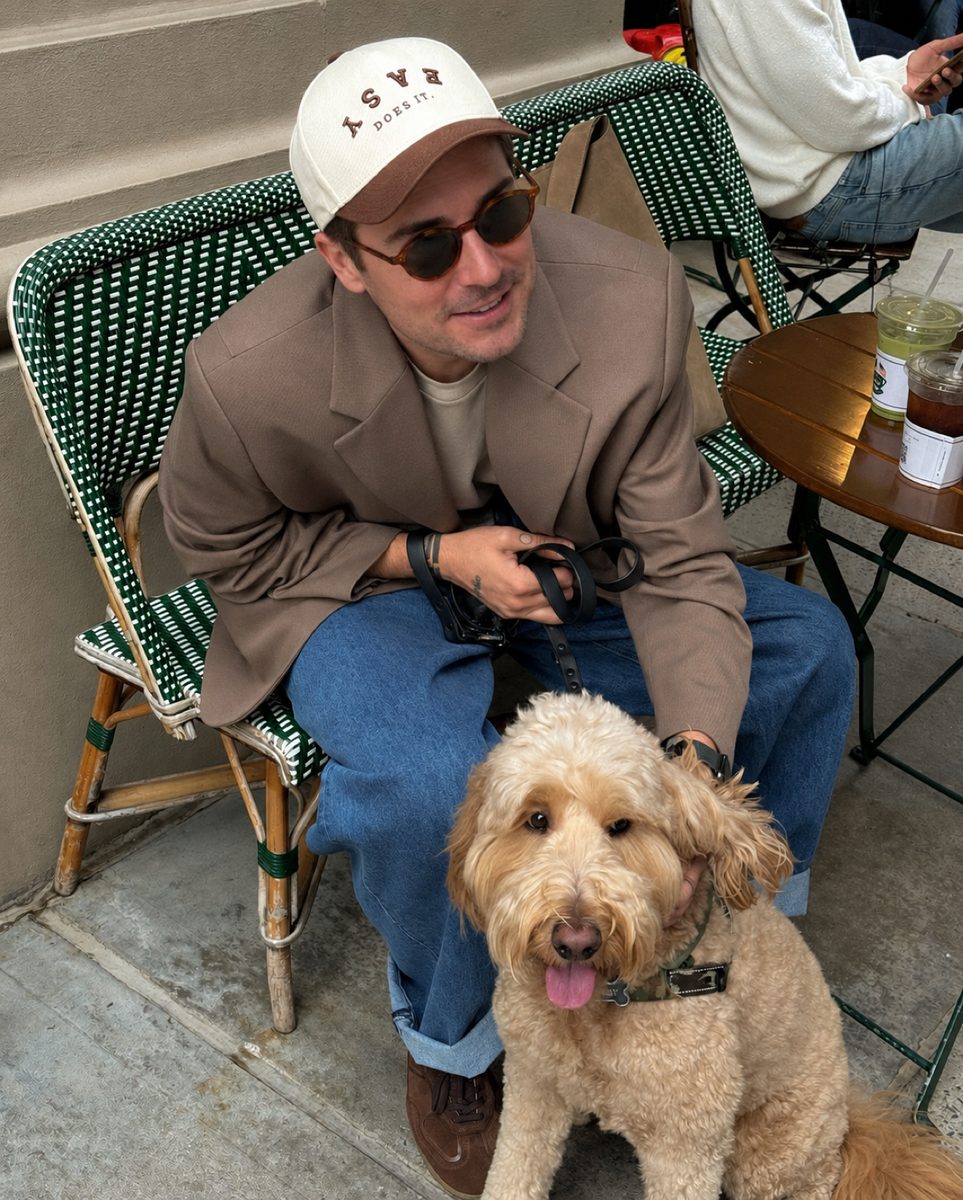
A Tinder picture with your dog works best as your second or third photo, with your face clearly visible and the dog obviously yours. It gives matches an easy first message, but it shouldn't replace a clear solo shot of you up front.



 Made with DatingProfile
Tinder dog pics are the closest thing dating apps have to a cheat code. A dog says you can keep something alive, gives people an easy opener ("What's her name?") and makes you look relaxed. But a bad Tinder dog photo is also one of the most common profile mistakes. Here's how to get it right.
Why a Tinder picture with your dog works
- It's an instant opener. Asking about a dog is easier than inventing a clever line, so people actually message.
- It shows a side of you. Patient, outdoorsy, a bit soft. Without you having to write any of it.
- It looks natural. People smile more around their dogs. Candid smiles beat posed ones.
Tinder's own Photo Tips feature says photos showing "a mix of activities, settings, and poses" give people a fuller sense of you. A dog photo is a natural way to add variety to a profile that's mostly selfies.
Where to put your Tinder dog photo
Not first. Your first photo has one job: show your face clearly. If the dog is the star of photo one, people can't tell what you look like, and the dog gets the swipe, not you.
The sweet spot is photo two or three, right after your clear solo shot. By then they know your face, and the dog adds warmth.
A simple order that works:
- You alone, face clear, smiling
- You with your dog, both visible
- Full-body or activity photo
- A social or travel photo
How to take good Tinder dog photos
Dogs don't take direction. These make it easier.
- Get down to their level. Crouch or sit so you and the dog are close together in the frame.
- Shoot outside in soft light. A park in the late afternoon or a shady café terrace beats a dim living room.
- Have a friend shoot a burst. Hold a treat just above the lens, let them take 30 photos, and pick the one where you're both looking good.
- Keep your face visible. No sunglasses in this one if you can help it, and don't let the dog block you.
- Make it a moment. Walking, playing fetch, a café stop. A scene reads better than a stiff portrait.
- Clean up the background. No laundry piles, dog beds or chewed-up sofa cushions.
The best types of Tinder dog pictures
| Photo | Why it works |
|---|---|
| Sitting at a café with your dog at your feet | Relaxed and social, shows your everyday life |
| On a hike or trail together | Outdoorsy, active, natural light |
| Close-up, both looking at the camera | Warm and simple, easy to see your face |
| Mid-play, throwing a ball or running | Candid energy, real smile |
| Cuddled on a tidy sofa | Homey, but only if the room looks good |
Tinder dog pics that backfire
- The dog is your profile photo and you're a blur behind it.
- The dog isn't yours. People will ask. A borrowed or random dog feels like a trick.
- Every photo has the dog. One or two is charming. Five is a pet account.
- Puppy at a shelter or pet shop as a prop. It reads as staged.
- Cropped dog, cropped you. If you can't fit both of you in the frame, step back.
- Dark indoor shots. Dogs move, low light makes everything blurry.
No dog? Use another conversation starter
Don't stage one. If you love dogs but don't have one, say so in your bio ("Will be distracted by every dog we pass") and use a different photo that invites a question: cooking, playing an instrument, a trip, a sport. For more ideas, see Tinder pictures and Tinder pictures for guys. And if a match does ask about dogs, you'll want a good line ready: try our dog pick-up lines.
A note on honesty: Tinder's Photo Verification compares a video selfie with your profile photos, so whatever you post, the person in it needs to be you.
Fix the rest of your Tinder photos from one selfie
Take the dog photo yourself, with your own dog: that's the one that should be real. Where profiles usually fall short is everything around it, such as a weak lead photo, no full-length shot or nothing recent. DatingProfile can cover those slots with the HyperReal™ method. A single clear selfie is enough (up to 4 improve the likeness), you choose styles like a café terrace, a trail, a trip or a dinner, and each style gives you 4 shots in about a minute. Put the ones that look like you today next to your real dog photo, and keep within Tinder's rules on honest photos. It's $29 for up to 30 photos or $49 for up to 140, paid once, with a 14-day guarantee.
Pricing
Packs and prices
Two one-time packs. Pay once: no subscription, nothing to cancel. Both are covered by the refund policy.
The Fix Pack
A quick upgrade for your profile.
$29one-time
Up to 30 photos · $0.97 per photo
Choose Fix- HyperReal™ photos in any of 62 styles
- Ready in about a minute
- Works with app photo verification
- 14-day satisfaction guarantee
The Pro Pack
The sweet spot for a full glow-up.
$49one-time
Up to 140 photos · $0.35 per photo
Choose Pro- HyperReal™ photos in any of 62 styles
- Enough for about 35 styles, 4 shots each
- Lowest price per photo
- Ready in about a minute
- Works with app photo verification
- 14-day satisfaction guarantee
DatingProfile vs a dating photographer
| Factor | DatingProfile |  Photographer |
|---|---|---|
| Cost | From $29 | $300–$500 per shoot |
| Turnaround | Under a minute per photo | Days to weeks |
| Scenes & outfits | 62 styles, 4 different shots each | Whatever fits in one shoot |
| Want more? | Buy another pack anytime | Book and pay again |
| Looks like you | Yes, made from your selfies | Yes |
Privacy: Your selfies and generated photos are never used to train AI models and are never shared or sold. Only you can see them, and you can delete them from your dashboard at any time.
Frequently asked questions
Do dog pictures help on Tinder?
A good one usually helps because it gives people an easy, friendly reason to message you. It works when you're clearly visible, the dog is clearly yours, and it isn't your first or only photo.
Should my Tinder profile picture be with my dog?
Usually not the first one. Your lead photo should be you alone, face clear and well lit. Put the dog photo second or third, where it adds personality after people know what you look like.
Is it okay to use a friend's dog in my Tinder photos?
Only if you say so. Matches will ask about the dog, and "oh, he's not mine" is a deflating answer. Bumble's own photo tips put it plainly, suggesting a pet photo only if it's yours.
How many dog photos should I post on Tinder?
One, maybe two if they're very different. More than that and your profile becomes the dog's profile, which makes people wonder what else is going on in your life.
What if I don't have a dog?
Don't borrow one for a staged photo. Use another conversation starter instead, like a hobby, a trip or something you cook. If you love dogs, say so in your bio, which can start the same conversation.
Sources
Keep reading
More photo guides
- Tinder PicturesLead with a clear, smiling solo face photo, then add full body, a hobby, a social shot and a place.See the guide
- Dating Profile PicturesFour to six recent, well-lit photos: a clear face shot, full body, two or three real activities, nothing filtered.See the guide
- Dating App PhotosOne set of four to six clear, varied photos works on Tinder, Hinge and Bumble; only the counts and tools differ.See the guide
- Hinge PhotosHinge needs four to six photos; make each one easy to comment on, starting with a clear, smiling solo shot.See the guide
- AI Selfie GeneratorIt turns one selfie into new photos of you; pick one that keeps your face consistent and never trains on your photos.See the guide
- Tinder Selfie Under ReviewTinder is still checking your video selfie: usually minutes, up to 24 hours for a manual ID review.See the guide
Better photos, more matches
Turn one selfie into dating profile pictures
Hyperrealistic photos of you for Tinder, Hinge and Bumble, about a minute per photo. From $29, one-time.
Create my photos

