
Tinder
No Matches on Tinder? Why It Happens and How to Fix It
 By MarkUpdated November 20265 min read

Short answer
If you get no matches on Tinder, the most common cause is your photos, especially the first one, followed by narrow Discovery settings, a profile Tinder has hidden, or swiping when few people are active. Check that your profile is visible, widen your settings, then test and replace your first photo, which is the part people judge in a second.
No matches on Tinder almost always comes down to one of four things: your photos (especially the first one), Discovery settings that are too narrow, a profile Tinder has hidden, or swiping when few people are active. The photos are the most common cause by far, because they're what people judge in the second before they swipe. The good news is that all four are fixable, and you can check them in about ten minutes.
Work through the steps below in order. The early ones are quick and free; the photo fixes make the biggest difference.
Step 1: Make sure people can actually see you
Before changing anything else, rule out the reasons Tinder might not be showing your profile at all:
- Is your profile hidden? Tinder hides profiles when it "can't detect a valid face photo", and hidden profiles can't use Likes, Super Likes or Boost. If you lead with sunglasses, a mask, a far-away shot or no face photo, this could be you. Add a clear, well-lit photo of your face.
- Is Discovery switched on? In Settings, Enable Discovery must be on. With it off, Tinder says your profile "won't be shown to anyone new".
- Have you been warned, suspended or banned? Tinder tells you by email and in the app. If you haven't had a message, you probably aren't being punished.
Step 2: Check your Discovery settings
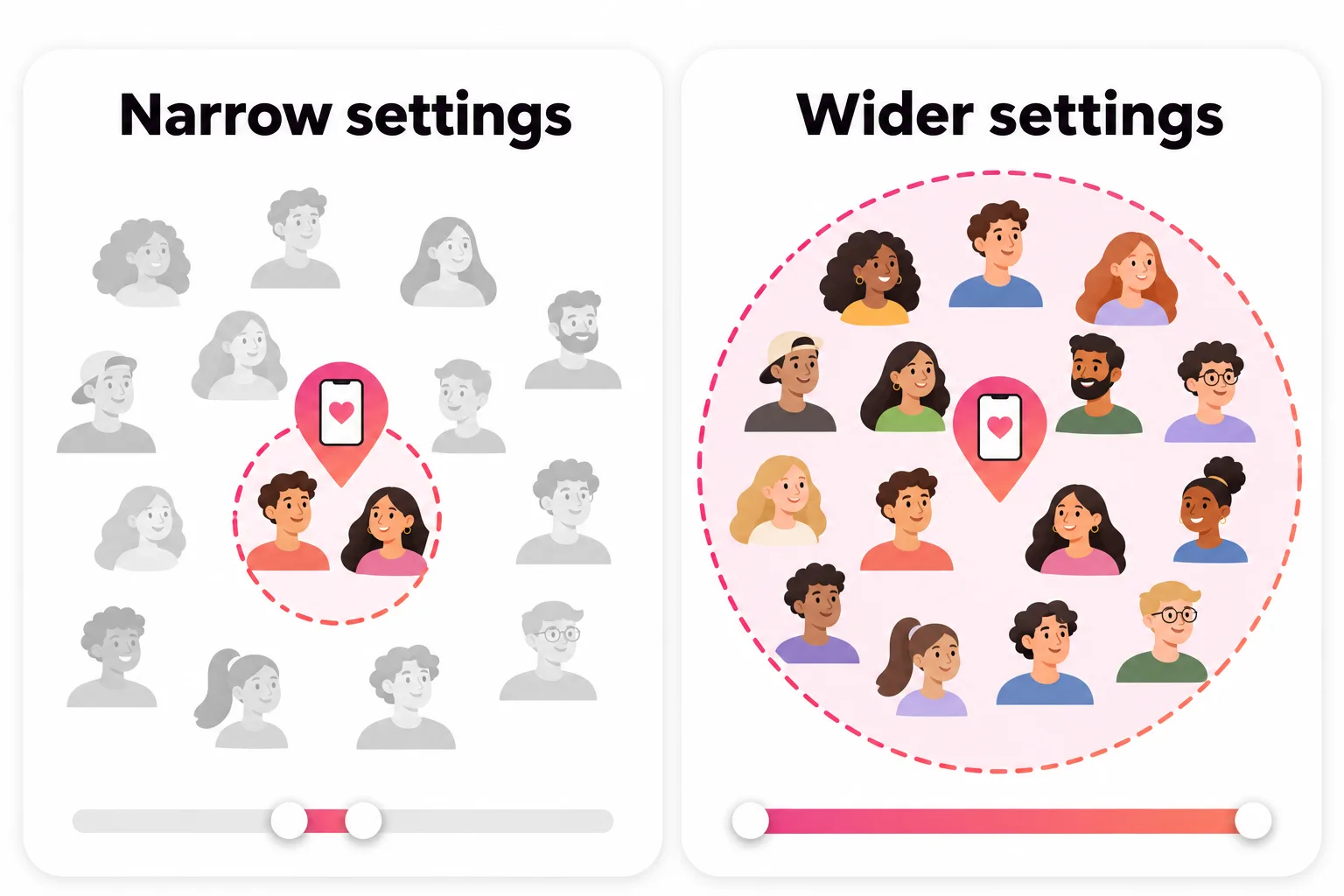
Tinder can only show you to people who fit your settings, and you only see people who fit theirs. A narrow age range or a 5 km radius in a small town can leave very few people on both sides.
- Profile icon, Settings, Discovery Settings.
- Widen your age range a few years each way.
- Increase your distance, especially outside big cities.
- Check the Dealbreaker toggles. Tinder says it may show people slightly outside your ranges when you run out, unless you make them dealbreakers.
If you're also seeing very few profiles yourself, that's a sign your settings are the problem. Tinder's own fix for an empty Discovery is exactly this: widen age, distance and gender preferences.
Step 3: Swipe when people are active
Tinder explains that it prioritises "potential matches who are active, and active at the same time". Using the app regularly, in the evening when more people are on, helps you appear in more stacks. Opening it once a week at lunchtime doesn't.
Step 4: Fix your first photo (the biggest lever)
Tinder's own advice for "no new matches" starts with "Update your bio or photos" and turning on Smart Photos, which leads with whichever photo gets the most likes. That's a big hint about where the problem usually is.
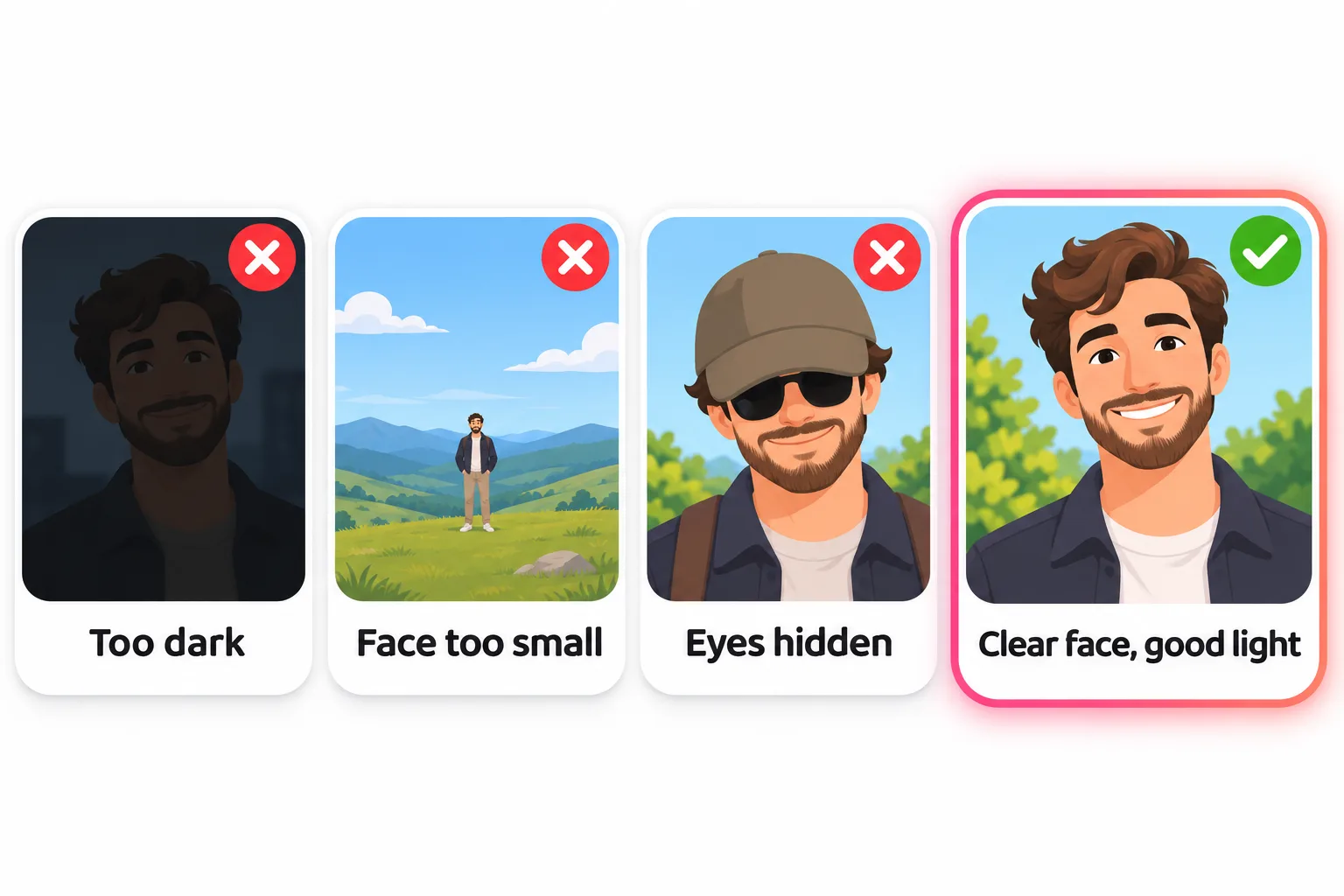
The first photo does most of the work. Common reasons it gets swiped left:
| Problem | Fix |
|---|---|
| Too dark or blurry | Daylight, facing a window or in open shade |
| Face too small (full-length from far away) | Chest-up, face filling about a third of the frame |
| Sunglasses, hat pulled low, mask | Eyes visible in photo one |
| Group photo | You alone; save the friends photo for later |
| Old photo | Taken in the last year, looks like you now |
| Unsmiling selfie in the car or bathroom | A relaxed photo someone else took |
The hardest part is being honest about your own photos, because everyone is a bad judge of their own face. That's what the free photo rater below is for: upload your photos and see which ones to lead with and which to drop.
Step 5: Build a full set of photos
After the first photo, people swipe through the rest to decide. Aim for 4 to 6 photos, each adding something new:
- A clear face photo (smiling, good light)
- A full-body photo
- You doing something you enjoy
- A social photo where you're easy to spot
- A travel or outdoors photo
In some markets Tinder's Photo Tips feature reviews your whole lineup and nudges you toward variety, for example replacing a near-identical selfie with a photo of you doing something. Our guide to dating profile pictures has examples of each type.
Step 6: Write a bio that gives people something to reply to
A blank bio isn't a deal-breaker, but a specific one helps the people on the fence and gives matches an easy first message. Two or three lines with something real (what you do on a Sunday, a strong food opinion, what you're looking for) beat a list of adjectives. Our best Tinder bios have plenty of examples to adapt.
Step 7: Swipe like you mean it
Swiping right on everyone burns through free likes and tells Tinder nothing about your taste. Tinder says it learns from your Likes and Nopes. Swiping thoughtfully helps it show you people who are more likely to like you back.
What doesn't fix no matches on Tinder
- Paying first. A Boost is "up to 10x more views", but more views of photos that aren't working mostly mean more left swipes. Fix the profile, then boost.
- Deleting and remaking your account. Tinder says bought Super Likes and Boosts don't transfer, your matches and chats are gone for good, and the new account starts with the same photos that weren't working.
- Assuming a shadowban. It's possible to be restricted, but it's far less common than a weak first photo. See Tinder shadowban for how to tell.
If you don't have good photos
Plenty of people own exactly one decent recent photo, and that shortage is often the real reason the matches don't come. The cheapest fix is a friend with a phone and an hour of daylight. If that's not happening, DatingProfile can make realistic dating photos from a selfie with the HyperReal™ method. One clear selfie is enough (up to 4 make the likeness even closer), and you pick the styles: outdoors, dinner, travel, with a dog. Then run the results through the photo rater like any other photo. Use only results that still look like you today, and follow Tinder's own photo rules: its owner, Match Group, has policy language against AI images that mislead people.



No good photos of yourself?
Turn a selfie into realistic dating photos: travel, dinner, outdoors and more. One selfie is enough. From $29, one-time.
If your Likes You count is stuck at zero too, or you want to know how the app decides who sees you, read no likes on Tinder and how Tinder's algorithm works.
Frequently asked questions
Why am I getting no matches on Tinder?
Most often because of your photos. Your lead photo gets a glance before the swipe, so if it's dark, distant, old or a group shot, it costs matches. Other causes are a narrow age or distance range, a profile Tinder has hidden because it can't detect a face, or swiping when few people near you are active.
How long should I wait before worrying about no Tinder matches?
A few days of normal swiping with no matches at all is worth acting on. Tinder itself says making a connection can take time and is not always instant, but zero matches over a week usually points to the profile or settings rather than bad luck.
Is getting no matches on Tinder a shadowban?
Usually not. Tinder doesn't confirm shadowbans. Bans and suspensions come with an email and an in-app notice, and a hidden profile is explained in the app. Rule out photos and settings before assuming you've been secretly restricted.
Does Tinder Gold or a Boost fix no matches?
Not by itself. A Boost brings more views, and Gold shows you who already liked you. If nobody is liking you, extra views just put the same weak first impression in front of more people. Fix the photos first, then use a Boost.
Why did my Tinder matches suddenly stop?
Tinder says it prioritises people who are active, so a break in your swiping can mean fewer people see you. Other causes are moving to a quieter area, changing your settings, or new photos that perform worse. Tinder's own advice for no new matches is to refresh your bio or photos and turn on Smart Photos.
Do I need a bio to get matches on Tinder?
No, but it helps. Photos decide most swipes, while a short, specific bio tips the people who are unsure and hands your matches an easy first message. A blank bio is a missed chance rather than a reason for zero matches.
Sources
- Tinder Help Center: Problems with Matches
- Tinder Help Center: Powering Tinder, the method behind our matching
- Tinder Help Center: My profile is hidden
- Tinder Help Center: Discovery Settings
- Tinder Help Center: I'm not seeing profiles in Discovery
- Tinder Help Center: Photo Tips
- Tinder Help Center: Consumables disappeared after creating a new account
Written and reviewed by
Dating profile editor at DatingProfile
Mark writes and reviews DatingProfile’s guides to dating profiles: the photos, bios and prompts that work on Tinder, Hinge and Bumble, and how each app actually behaves.
@mark_x_997


