Hinge
Does Hinge Notify Screenshots? What Happens When You Screenshot on Hinge
 By MarkUpdated November 20266 min read


Short answer
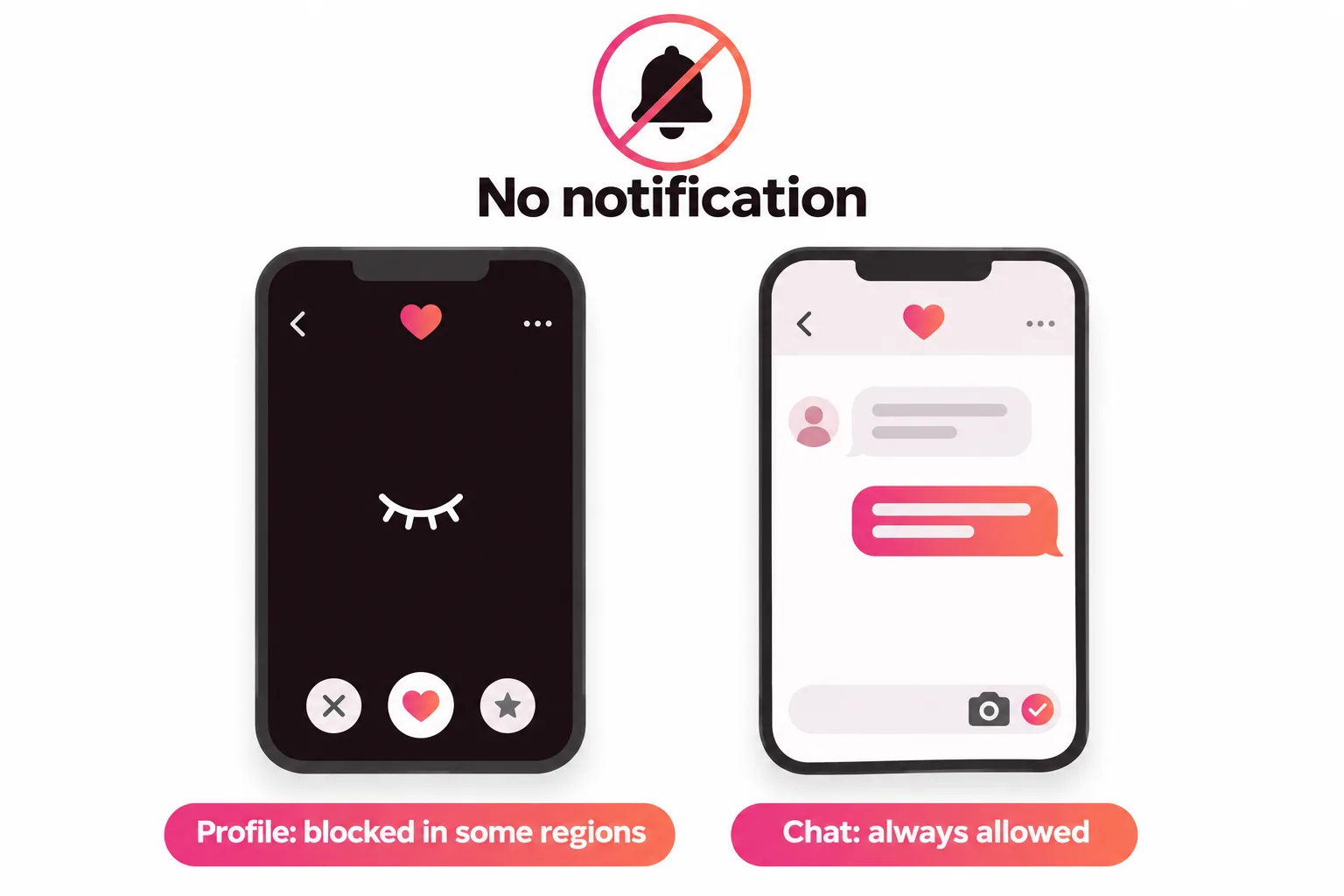
No, Hinge doesn't notify anyone when you take a screenshot, and nothing in its help center describes a screenshot alert as of November 2026. In some regions Hinge blocks screenshots and screen recordings of other people's profiles, Discover, Standouts and Likes You instead, but you can still screenshot your own chats and your own profile.
Does Hinge notify screenshots? No. Hinge doesn't tell anyone when you take a screenshot, and there's no screenshot alert described anywhere in its help center as of November 2026. What Hinge does instead, in some regions, is block screenshots of other people's profiles: the screen goes dark and a short message explains why.
So the honest answer has two parts. Nobody is ever notified. But depending on where you live, some screenshots won't work at all. Here's exactly what's blocked, what isn't and how to screenshot responsibly.
Does Hinge notify when you screenshot?
No. Taking a screenshot on Hinge sends nothing to the other person: no push notification, no message in the chat, no badge on your profile. That's true for profiles, prompts, photos and chats.
It's a common worry because Snapchat built its reputation on screenshot alerts, and people assume every app copied it. Hinge went a different way. Rather than telling people after the fact, it stops some captures from happening.
| What you screenshot | Is the other person notified? | Can it be blocked? |
|---|---|---|
| Someone's profile | No | Yes, in select regions |
| Discover, Standouts or Likes You | No | Yes, in select regions |
| A chat you're part of | No | No |
| Your own profile | No | No |
Does Hinge notify of screenshots of messages?
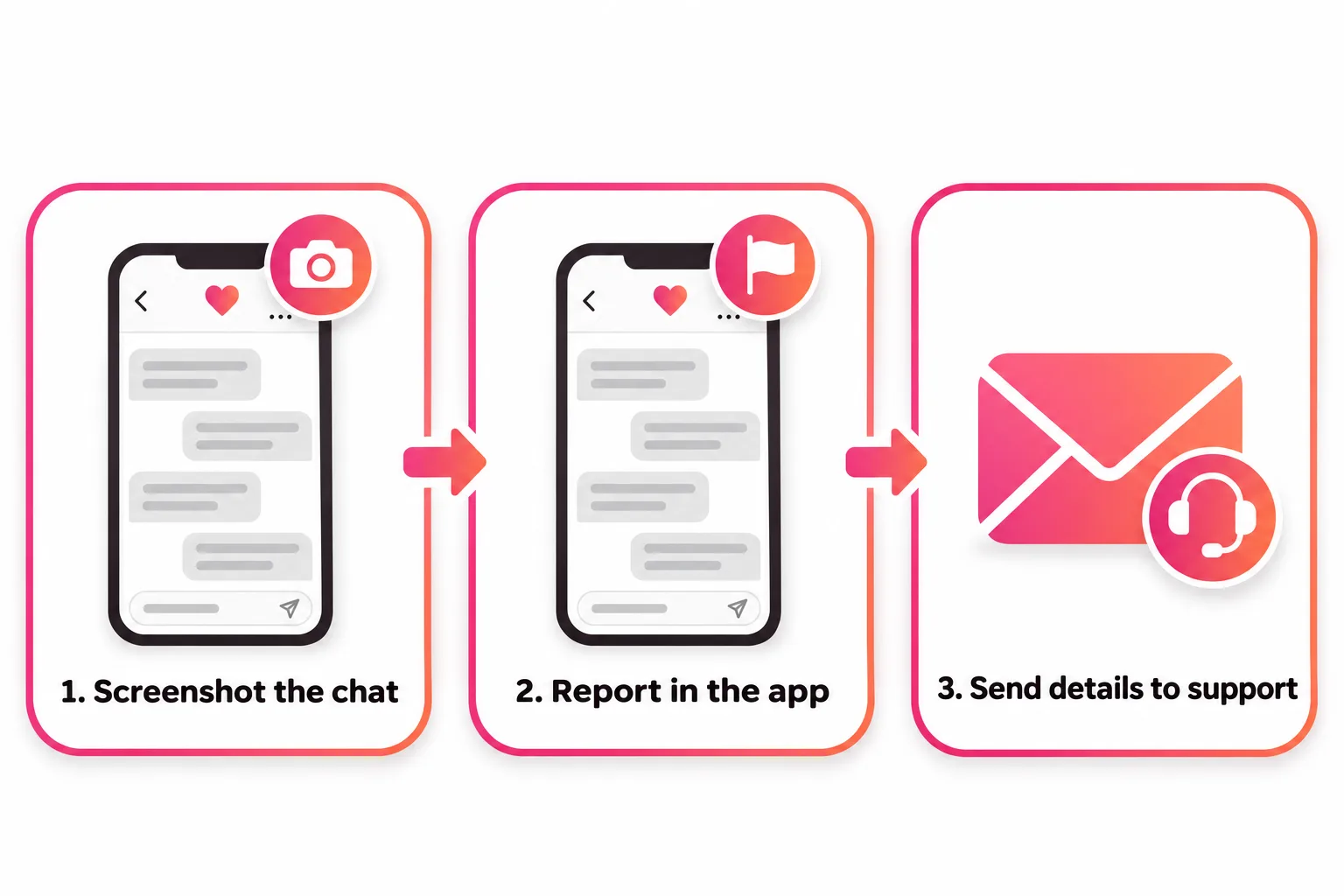
No, and chat screenshots aren't blocked either. Hinge's help center says you can always screenshot "any chats you're a part of", specifically so you can report anything that makes you uncomfortable. Its reporting pages actually ask for them: when you report a profile, Hinge suggests adding "screen grabs" through a support request, and its guide to reporting something that happened on Hinge lists screenshots as the best way to share someone's name, age, bio and photos.
So if a match sends something threatening, explicit or scammy, take the screenshot first, then report them from the chat (three dots, then Report). Hinge says reporting from Matches removes the match right away and the other person can't retrieve the conversation, which is why the screenshot matters: you can still send it to Hinge support with your report.
Hinge screenshot blocking: what's blocked and where
Hinge calls the feature Screenshot Blocking (Select Regions). When it's on, screenshots and screen recordings are blocked on:
- Discover, your main feed
- Standouts
- Likes You
- Anyone else's profile
If you try, "the page will go dark", in Hinge's words, and a short message appears. Hinge also hides those screens in your phone's app switcher, so the content doesn't show when you flip between apps.
Two things are never blocked:
- Chats you're part of, so you can report problems.
- Your own profile, because "it's your information, so it's yours to save or share."
Hinge doesn't publish the list of regions where blocking applies. If your screenshots of profiles work normally, you're probably in a region without it. Either way, nobody gets notified.
Why Hinge blocks screenshots instead of sending alerts
Hinge's stated reason is privacy: blocking "can help prevent daters' personal information from being shared without their knowledge or consent." A notification only tells someone their photo has already been saved. A block stops it from leaving the app in the first place, which is the outcome most daters actually want.
Can you screenshot a Hinge profile?
Outside the blocking regions, yes, technically. Inside them, no. But being able to doesn't settle whether you should. A few situations, and how to think about each:
- Asking a friend for a second opinion on a match. Common and usually harmless, but share it with one person you trust, not a group chat.
- Saving a profile to remember someone. You don't need to. Liking or matching keeps them in the app, and Hinge only lets you see profiles you've liked once they match with you anyway.
- Posting someone's profile publicly to mock it. Don't. It's the exact harm Screenshot Blocking was built to prevent, and it can get ugly fast.
- Reporting a fake or harmful profile. Report it in the app first. That removes them from your view immediately. Then add details through Hinge support if needed.
Is it against Hinge's rules to screenshot?
Taking a screenshot isn't against the rules on its own; if it were, Hinge wouldn't leave chats unblocked. What you do with it can be. Hinge's Community Guidelines prohibit:
- Threatening to reveal someone's intimate messages, photos or personal information to pressure them into anything.
- Harassment, including "repeated, unwanted contact either online or offline". Hinge says that if someone unmatches you, the next step "is to respect their choice, not find them on social media."
- Posting content you didn't create or don't have permission to use, which covers putting someone else's photos on your profile.
Hinge says it may warn or ban members depending on how serious and how frequent the reports are, so sharing a match's screenshots to embarrass them can cost you your account.
What Hinge does tell other people (and what it doesn't)
If you're worried about being watched, here's the full picture of what Hinge shows or hides, based on its help center:
- Screenshots: never notified.
- Last Active: "Active Now" or "Active Today" can show on your profile in Discover, Standouts and Likes You. Your matches don't see it, and you can hide it in Settings (if you do, you can't see other people's either).
- Boosts: Hinge says other users won't know you're boosted.
- HingeX Priority Likes: look exactly like regular likes to the person receiving them.
- Block List: contacts you block "won't be notified that you blocked them."
- Unmatching: Hinge doesn't describe an unmatch alert, but the match disappears from the other person's Matches list, so they can tell.
Screenshotting your own profile: the useful kind
The screenshot most worth taking on Hinge is of yourself. Hinge never blocks your own profile, and a screenshot is the easiest way to get honest feedback. Tap your photo icon, then the pencil, then View to see your profile the way others do, and capture each section.
Send it to a friend with a specific question rather than "is this good?":
- Which photo would you lead with?
- Does any prompt sound like someone else wrote it?
- What would you comment on if you saw this profile?
If nobody can find anything to comment on, that's the fix. Our guide to good Hinge profiles shows what to aim for, the Hinge profile examples show complete sample profiles, and Hinge prompts has answers that give people something to react to. If your photos are the weak spot, start with Hinge photos.



No good photos of yourself?
Turn a selfie into realistic dating photos: travel, dinner, outdoors and more. One selfie is enough. From $29, one-time.
Sending things you'd rather not screenshot
Since you can't send pictures in Hinge chat at all (see can you send pictures on Hinge), most screenshot worries are really about what's in your messages. Keep early chats to things you'd be fine with anyone reading, and move to another app only when you trust the person. If a conversation is stuck, our guide to how to start a conversation on Hinge has openers that keep things easy and light.
Frequently asked questions
Does Hinge notify when you screenshot?
No. Hinge doesn't send the other person any alert when you take a screenshot, and its help center doesn't describe a screenshot notification anywhere. What it does in some regions is block screenshots of other people's profiles, so the screen goes dark instead.
Does Hinge notify of screenshots of messages?
No. Screenshots of a chat you're part of aren't blocked and don't trigger any alert. Hinge keeps chat screenshots allowed on purpose, so you can save evidence and report anything that makes you uncomfortable.
Can you screenshot a Hinge profile?
It depends where you are. In regions with Screenshot Blocking, screenshots and screen recordings are blocked on other people's profiles and in Discover, Standouts and Likes You; the page goes dark and you see a short message. Elsewhere it works normally, and either way the person isn't told.
Why does my screen go black when I screenshot Hinge?
That's Hinge's Screenshot Blocking. In some regions Hinge blocks captures of screens that show another dater's profile or photos to protect their privacy. If it blocks a screen you think it shouldn't, Hinge asks you to contact support.
Does Hinge notify screenshots in 2026?
No. As of November 2026 Hinge still doesn't notify anyone about screenshots. The change in recent years is blocking, not alerts, and it only applies in select regions that Hinge doesn't list.
Can I screenshot my own Hinge profile?
Yes. Hinge says your own profile is never blocked, because it's your information to save or share. It's a handy way to get a friend's opinion on your photos and prompts.
Sources
- Hinge Help Center: Screenshot Blocking (Select Regions)
- Hinge Help Center: How do I report someone?
- Hinge Help Center: I need to report something that happened on Hinge
- Hinge Help Center: Community Guidelines
- Hinge Help Center: Last Active Status
- Hinge Help Center: How can I Block People I Know?
- Hinge Help Center: What is Boost?
- Hinge Help Center: Subscriber Experience
Written and reviewed by
Dating profile editor at DatingProfile
Mark writes and reviews DatingProfile’s guides to dating profiles: the photos, bios and prompts that work on Tinder, Hinge and Bumble, and how each app actually behaves.
@mark_x_997