Hinge
Hinge Plus vs Hinge X: Every Difference Between Hinge+ and HingeX
 By MarkUpdated November 20266 min read


Short answer
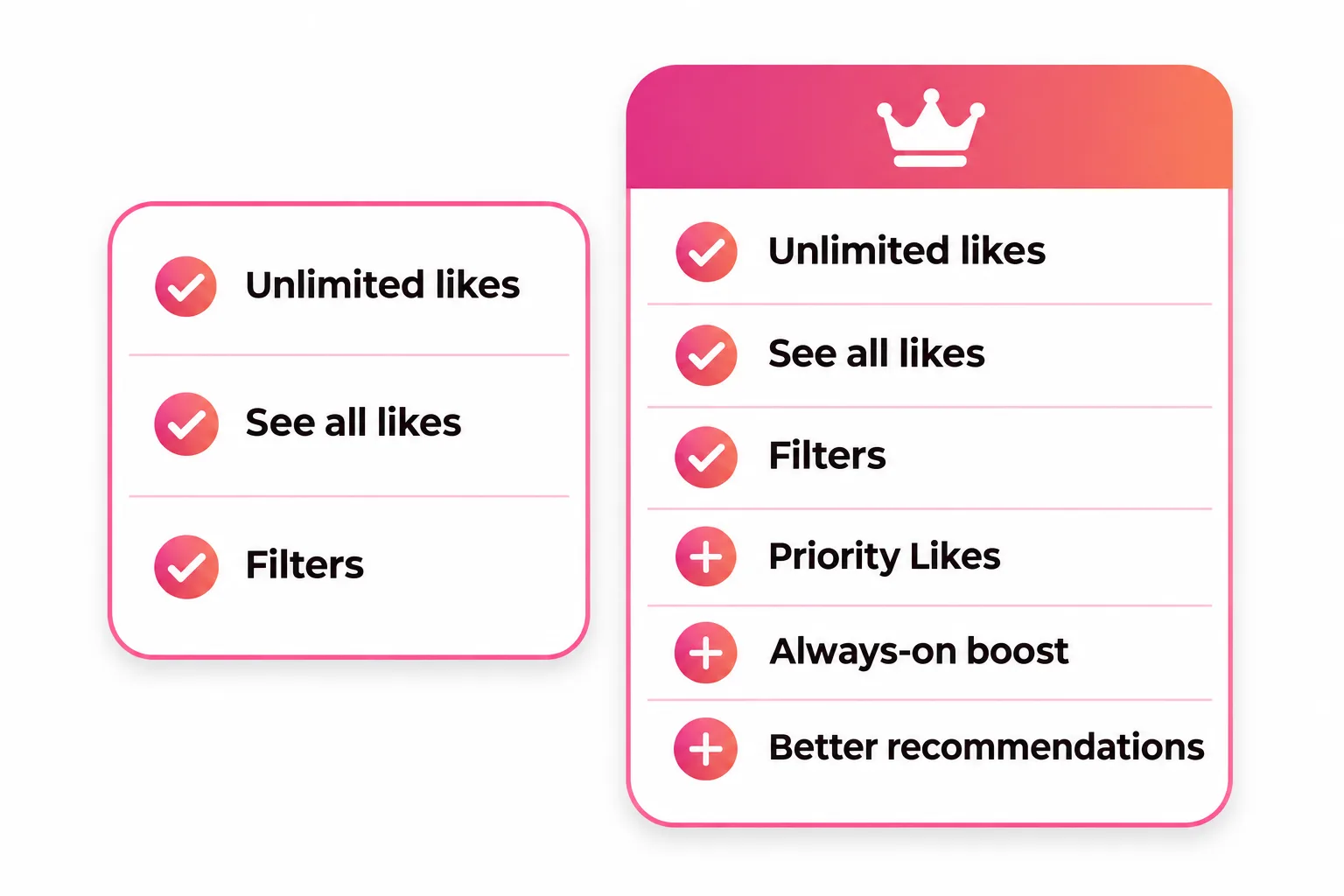
Hinge+ and HingeX both give you unlimited likes, see everyone who liked you at once, unlimited undo skips and advanced filters. HingeX adds three things on top (Priority Likes that stay near the top of someone's list for 7 days, an always-on light boost, and recommendations that bring people more your type to the top of Discover) and it costs more, with prices that vary by country and plan length.
Hinge Plus vs Hinge X: what's the difference? Both Hinge+ and HingeX give you unlimited likes, let you see everyone who liked you at once, add advanced filters and give unlimited undo skips. HingeX adds three extras on top: Priority Likes, an always-on light boost and recommendations that push people more your type to the top of your feed. It also costs more.
So the real question isn't which is better. It's whether those three HingeX extras solve a problem you actually have. Here's the full comparison, as of November 2026.
Hinge Plus vs Hinge X at a glance
| Feature | Free | Hinge+ | HingeX |
|---|---|---|---|
| Match and message | Yes | Yes | Yes |
| Likes per day | About 8 (reported) | Unlimited | Unlimited |
| See who liked you | One at a time | All at once | All at once |
| Undo skips | 1 a week | Unlimited | Unlimited |
| Advanced filters (height, family plans, politics and more) | No | Yes | Yes |
| Sort likes by Last Active and Nearby | No | Yes | Yes |
| See Compatible People Sooner | No | No | Yes |
| Get Seen by More Daters (always-on boost) | No | No | Yes |
| Priority Likes | No | No | Yes |
| Free roses | 1 a week | 1 a week | 1 a week |
The free like count comes from our guide to how many likes per day on Hinge; Hinge itself only says free users get "a select number."
What Hinge+ and HingeX both include
These features are identical on both plans:
- Unlimited likes. Free accounts get a small daily allowance; subscribers can keep liking, as long as they keep up with their matches (more on Your Turn Limits below).
- See all your likes at once. Free users see incoming likes one at a time. Subscribers see the whole list and can also sort it by Last Active (people active in the last 24 hours) and Nearby.
- Unlimited undo skips. Bring back the last profile you skipped as often as you like, instead of once a week.
- Advanced dating preferences. Hinge lists height, children, family plans, education level, politics, drinking, smoking, marijuana and drug use, plus dating intentions in its preferences settings.
- Discover filters. Quick filters at the top of Discover for things like Active Today and New Here.
- A Signals filter. Subscribers can sort Discover to prioritize people with Hinge's Signals badge, which marks daters who read profiles, comment and follow through on matches.
If those are what you want, Hinge+ is enough.
What HingeX adds over Hinge+
Priority Likes
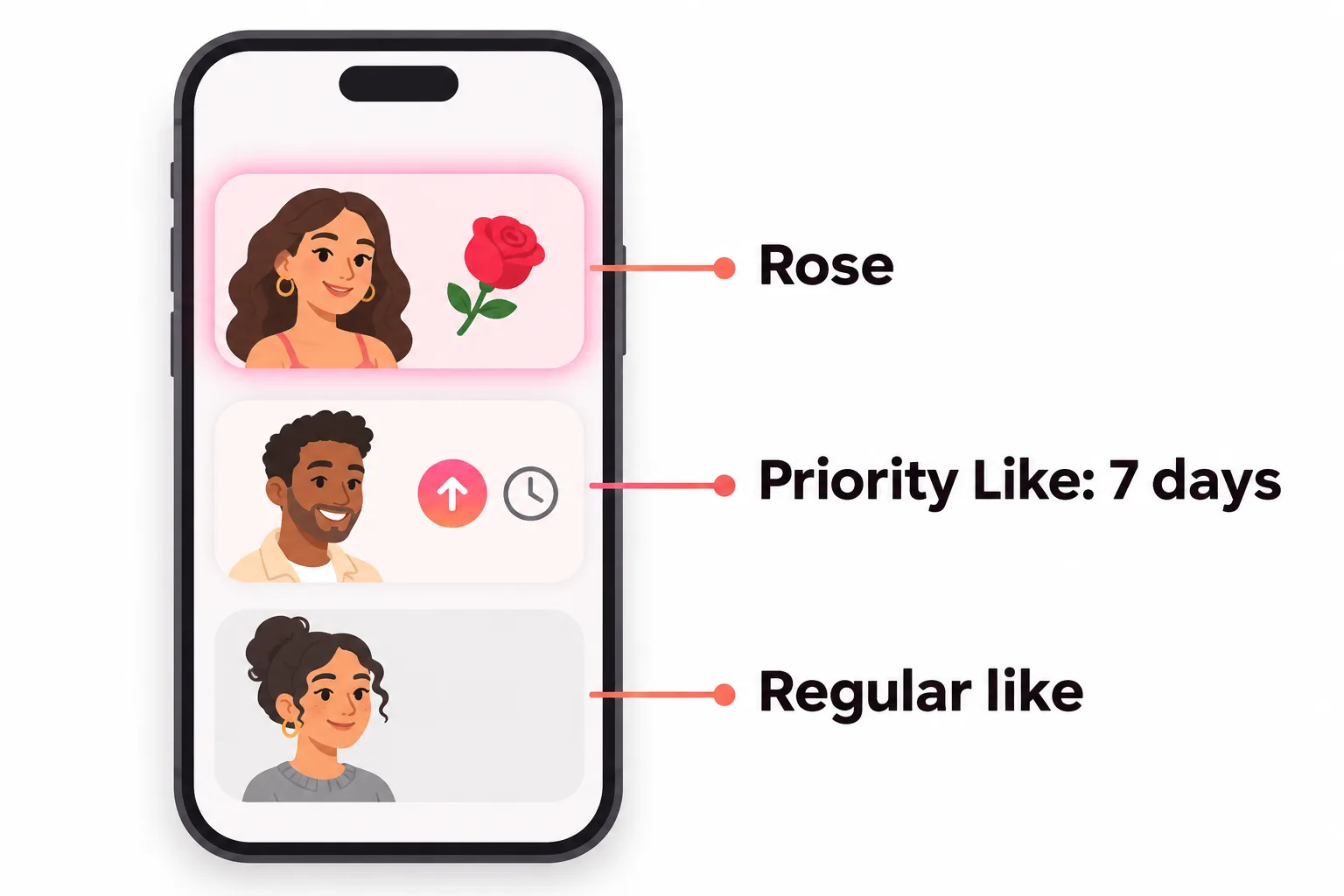
Every like you send on HingeX stays toward the top of the recipient's Likes You list for 7 days, then becomes a regular like. It looks exactly like a normal like; only you know it's a priority one. When the list is sorted by Recent, Hinge orders it like this:
- Roses
- The most recent like (priority or regular)
- Priority Likes
- Regular likes
So a Priority Like beats regular likes but always sits below a rose. That matters most if you're liking people who get a lot of attention, where a normal like can get buried. See Hinge roses for how roses compare.
Get Seen by More Daters
Hinge calls this "a light but always-on version" of its Boost feature. While your HingeX subscription is active, your profile is pushed toward the top of other people's Discover feeds. It doesn't override anyone's preferences. A one-off Boost lasts one hour (a Superboost lasts 24) and may rank you higher during that window.
See Compatible People Sooner
HingeX uses shared preferences and your recent likes and skips to bring people you're likely to be into to the top of your own Discover feed. Hinge contrasts it with Standouts, which every member gets: Standouts shows profiles getting a lot of attention, and you can only reach them with a rose, while HingeX's recommendations appear in Discover and can take a normal like.
What neither plan includes
- Extra roses. Everyone gets 1 free rose a week; more come in packs of 3, 12 or 50.
- Boosts. Bought separately on every plan.
- Unlimited likes no matter what. Your Turn Limits apply to everyone: with too many matches waiting on your reply, you can't send or receive new likes until you answer someone or end a chat. Hinge says it's "not a limit on the amount of Likes you can send."
- A visible badge. Your subscription is private; nobody can see what plan you're on.
Hinge Plus vs Hinge X price
Hinge doesn't publish prices; they vary by country and by plan length, and you see yours in the app (photo icon, gear icon, Subscribe to Hinge). Hinge offers weekly, monthly, three-month and six-month plans.
For a rough idea, VIDA Select lists these US dollar prices, updated November 2026:
| Plan length | Hinge+ | HingeX |
|---|---|---|
| 1 month | $32.99 | $49.99 |
| 3 months | $64.99 (about $21/month) | $99.99 (about $33/month) |
| 6 months | $99.99 (about $16/month) | $149.99 (about $24/month) |
Treat those as reported examples, not official prices. On iPhone, Hinge also lets you pay through its own Hinge payment (powered by Stripe) instead of the App Store; check both prices on the subscription screen.
Switching between Hinge+ and HingeX
- Upgrading from Hinge+ to HingeX starts right away. If you paid through Apple, Apple refunds the unused Hinge+ time; through Hinge payment it's credited toward HingeX; on Google Play it's credited to the new plan. Upgrading doesn't change your plan length.
- Downgrading from HingeX to Hinge+ means canceling HingeX, then subscribing to Hinge+.
- Canceling: turn off auto-renew at least 24 hours before your renewal date. Deleting the app doesn't cancel a subscription.
- Refunds: Hinge says Apple and Google handle refunds for purchases made through them. For Hinge payment, you can ask Hinge support about a subscription bought in the last 14 days. Roses and Boosts are final.
Which should you choose?
Pick Hinge+ if:
- You regularly run out of likes on people you genuinely want to meet.
- You want to see everyone who liked you and match with them fast.
- Filters like height, family plans or drinking matter to you.
Pick HingeX if:
- You already get matches, but you're liking busy profiles and want your likes seen first.
- You live somewhere with lots of daters and want more visibility without buying Boosts.
- You've used Hinge+ for a while and still feel your likes disappear into crowded inboxes.
Stay free (for now) if: your likes rarely turn into matches. More likes or more visibility won't fix a profile that isn't landing; it just sends more people to the same first photo. Our full verdict on whether the premium tier pays off is in is HingeX worth it.



No good photos of yourself?
Turn a selfie into realistic dating photos: travel, dinner, outdoors and more. One selfie is enough. From $29, one-time.
Fix the profile before you pay
Both plans make you more visible or let you like more people. What happens next still depends on your first photo and your prompts. Before subscribing, check our guide to good Hinge profiles and swap any weak photo using our Hinge photos guide. If your likes don't seem to come back each morning, when Hinge likes reset explains the timing.
Frequently asked questions
What is the difference between Hinge+ and HingeX?
Both include unlimited likes, seeing all your likes at once, unlimited undo skips and advanced filters. HingeX adds Priority Likes, Get Seen by More Daters (an always-on light boost) and See Compatible People Sooner, which puts people more your type at the top of Discover.
Is HingeX better than Hinge+?
It has more features, but whether it's better for you depends on your problem. If you mainly want unlimited likes and filters, Hinge+ covers it. HingeX helps most when your likes are getting buried in busy inboxes or you want more visibility.
How much more does HingeX cost than Hinge+?
Hinge doesn't publish prices, which vary by country and plan length. In US dollars, VIDA Select lists Hinge+ at $32.99 and HingeX at $49.99 for one month as of November 2026, with lower monthly rates on 3- and 6-month plans. Check the in-app price before buying.
Do Hinge+ or HingeX give you free roses or boosts?
No. Everyone, free or paid, gets one free rose a week. Extra roses and Boosts are separate purchases on every plan. HingeX's Priority Likes work a bit like roses but rank below them.
Can I switch from Hinge+ to HingeX?
Yes. Upgrading starts HingeX immediately, and Hinge or your app store credits or refunds the unused Hinge+ time depending on how you paid. Downgrading from HingeX to Hinge+ means canceling HingeX first, then subscribing to Hinge+.
Do Your Turn Limits apply to Hinge+ and HingeX?
Yes. If too many matches are waiting on your reply, you can't send or receive new likes on any plan until you reply or end a chat. Hinge says this isn't a limit on how many likes subscribers can send.
Sources
- Hinge Help Center: Subscription and Purchase Benefits
- Hinge Help Center: Subscriber Experience
- Hinge Help Center: Subscribing to Hinge+ or HingeX
- Hinge Help Center: Adjusting or Canceling Your Subscription
- Hinge Help Center: How do I change my Preferences?
- Hinge Help Center: What is the difference between Standouts and HingeX?
- Hinge Help Center: What is Your Turn Limits?
- Hinge Help Center: What is Signals?
- Hinge Help Center: How can I request a refund?
- VIDA Select: Hinge Plus vs HingeX (pricing, updated November 2026)
Written and reviewed by
Dating profile editor at DatingProfile
Mark writes and reviews DatingProfile’s guides to dating profiles: the photos, bios and prompts that work on Tinder, Hinge and Bumble, and how each app actually behaves.
@mark_x_997