
Tinder
Tinder Ban Appeal: How to Appeal a Tinder Ban, Step by Step
 By MarkUpdated November 20265 min read


Short answer
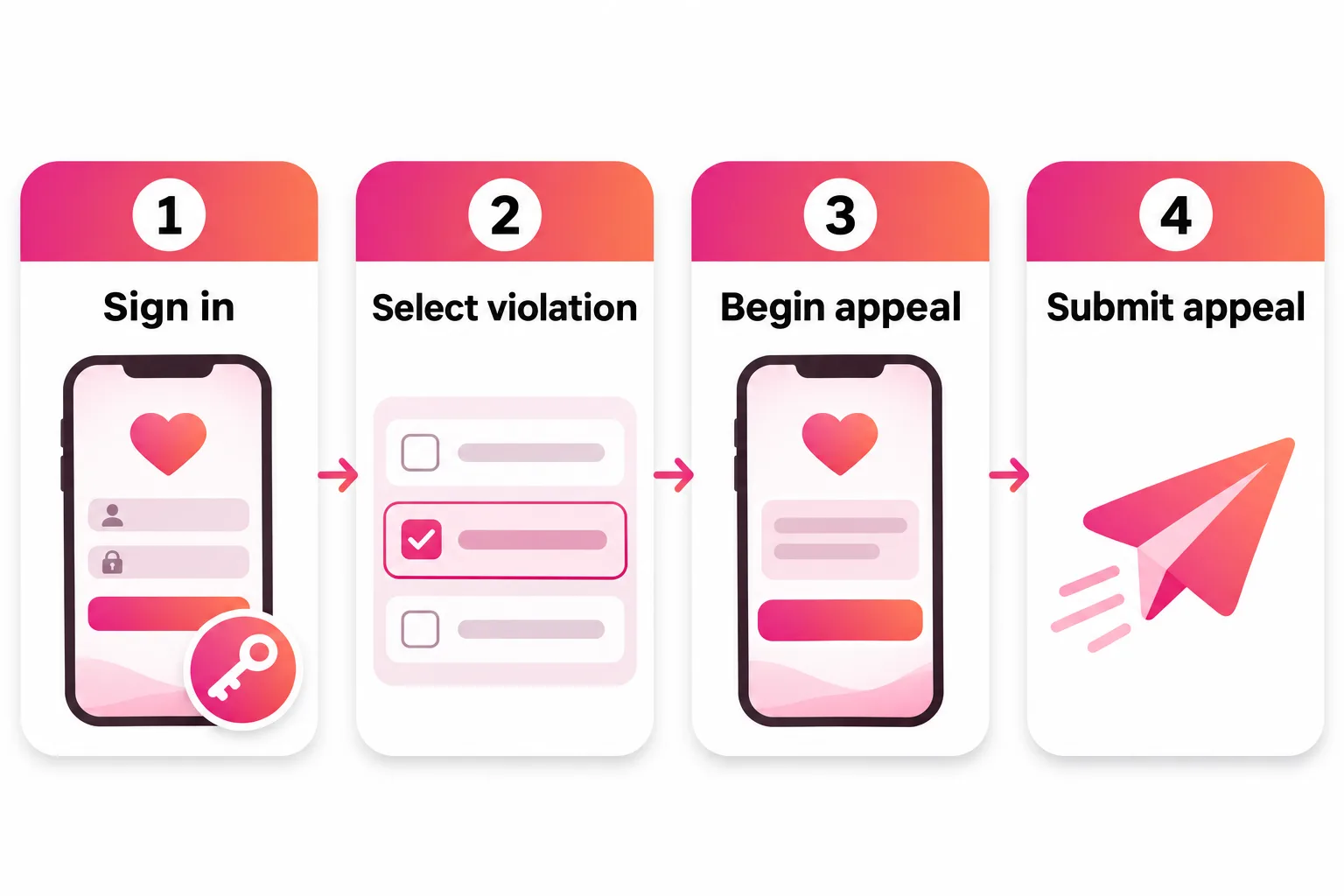
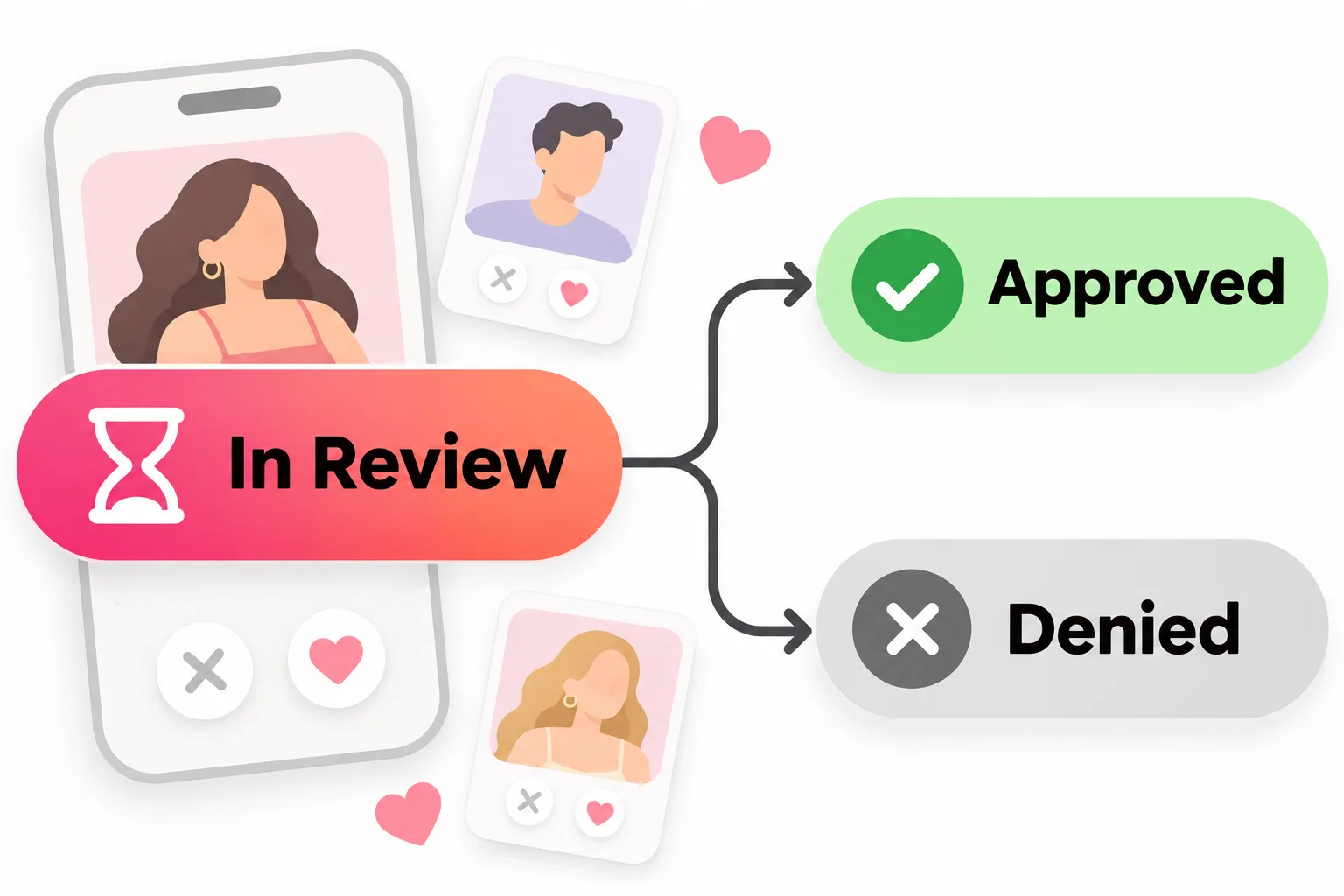
To appeal a Tinder ban, sign in to Tinder's Appeal Center at tinder.com/appeals-center with your usual Tinder login, select the violation, tap Begin appeal and then Submit appeal. You can only appeal violations from the last 6 months and each one only once; the appeal shows In Review until it changes to Approved, which reinstates your account, or Denied.
How do you appeal a Tinder ban? Sign in to Tinder's Appeal Center (tinder.com/appeals-center) with the same login you use for Tinder, select the violation, tap Begin appeal, then Submit appeal. You have 6 months from the violation, and you can appeal each action once. The appeal then shows In Review until it changes to Approved (your account is reinstated) or Denied.
That's the whole official process, and it's the only legitimate way back after a ban. Below: each step in detail, how to read what the Appeal Center tells you, what happens after you submit, and what to do if your appeal is denied. If you're not sure yet whether you were banned or suspended, start with our Tinder ban guide.
What you can appeal on Tinder
The Appeal Center handles every kind of action Tinder takes on an account:
- Bans (the account is removed and you can't create a new one)
- Suspensions (you can return after 6 months anyway, but an approved appeal ends it sooner)
- Warnings
- Content removals (a photo or text taken off your profile)
Each one shows up as a separate violation, and you can appeal any that are still active, meaning applied in the last 6 months and not yet appealed.
How to appeal a Tinder ban, step by step
- Open the Appeal Center at tinder.com/appeals-center.
- Sign in with your Tinder login. Tinder says you use the same login details as your Tinder account. If your phone number has changed, Tinder's account recovery is under Log In, then "Trouble Logging In?", using the email on your account.
- Look at the overview. You'll see every action that can be appealed. Tap See details on a violation to read more about it.
- Select the violation you want to appeal.
- Tap Begin appeal.
- Tap Submit appeal.
If there's more than one violation you want reviewed, select all of them before you submit. Tinder specifically calls this out, and since you only get one appeal per action, don't leave one behind.
Read the violation details before you appeal
The details screen tells you more than most people realize. Tinder's glossary explains the terms:
| Field | What it tells you |
|---|---|
| Violation Type | The name of the policy Tinder says you broke |
| Description | More detail on what happened |
| Action Taken | Ban, suspension, warning or content removal |
| Flagged by | Report(s) from users or others, Automated Systems, or a Tinder Initiated Review |
| Reviewed by: Automated System | The decision was made by automated tools without a human moderator |
| Last Updated | When the appeal was submitted, or when its review finished |
Two of these matter most for deciding whether to appeal:
- The violation type. Compare it with Tinder's Community Guidelines. If the rule plainly doesn't fit what you did, that's a strong case for an appeal.
- "Reviewed by: Automated System". Automated tools make mistakes, for example with photos that look like someone else, or text that looks like spam out of context. An appeal asks for a fresh look.
What happens after you appeal
- The violation moves to the Appealed tab with an In Review label.
- When Tinder has reviewed it, the label changes to Approved or Denied.
- Approved: the violation is reversed. Tinder reinstates your account, reverses the warning or restores your content, depending on what you appealed.
- Denied: the violation stands, and a banned account isn't reinstated.
One surprise to be ready for: if Tinder finds another violation during its review, it shows up as a new item in the Appeal Center. You can appeal that one too.
How long does it take? Tinder doesn't publish a review time, so be wary of anyone who quotes a precise number. Check the Appeal Center and your email (including spam) for updates.
Time limits: the 6-month rule
Tinder says that if you don't see a violation, or don't see the option to appeal it, it can't be appealed through the Appeal Center, usually because:
- the violation happened more than 6 months ago (the glossary calls these expired), or
- you've already appealed that action.
So appeal as soon as you've read the details. Waiting doesn't improve your chances, and after 6 months the option is gone.
Appealing an age ban
In regions with mandatory age checks, Tinder says that if its review decides you're likely under 18, the account is banned and you need to appeal to use Tinder again. If you're an adult and this happened to you:
- Appeal through the Appeal Center like any other violation.
- Expect a possible ID verification check. Tinder describes an automated review and a manual review that can take up to 24 hours.
- In Australia, Tinder says you can contact it to ask for a moderator review instead of submitting a government ID.
If your Tinder appeal is denied
A denial is usually the end of the road for that account. Each action can only be appealed once, and Tinder says banned users can't create new accounts. Please don't try to get around it with a new account. That breaks Tinder's one-person, one-account rule, and where Face Check is used Tinder checks for duplicate accounts.
What you can still do:
- Cancel any subscription. Tinder says you have to cancel Apple or Google subscriptions yourself, and its guidelines say it can terminate accounts without refunding purchases.
- Read the rules of any other app before you join it. Tinder says it shares information across Match Group companies (which include Hinge) to act against fake accounts, spam, abuse and fraud, including bans, so a serious violation can follow you. Our guide on how to get unbanned from Hinge explains how Hinge's own process works.
How to give your appeal the best chance
Tinder's process doesn't ask you to write an essay, so the work happens before you tap submit:
- Appeal only genuine mistakes. If the violation fits what happened, an appeal is unlikely to succeed.
- Select every related violation in one go.
- Appeal within 6 months, ideally right away.
- Make sure your login works so you can check the outcome.
- Fix the likely trigger before you're back, such as a photo that isn't clearly you or a handle in your bio.



No good photos of yourself?
Turn a selfie into realistic dating photos: travel, dinner, outdoors and more. One selfie is enough. From $29, one-time.
If your appeal is approved: come back clean
An approved appeal restores your account as it was, which is a good time to make sure nothing on it could be flagged again. Use photos that are clearly you, taken recently. Get Photo Verified on Tinder so people (and Tinder) can see you're real. Keep links and handles out of your bio. And if your matches are slow once you're back, see no matches on Tinder or the Tinder shadowban guide before assuming anything is still wrong.
Frequently asked questions
How do I appeal a Tinder ban?
Go to the Appeal Center at tinder.com/appeals-center and sign in with the same login details as your Tinder account. Find the violation, select it, tap Begin appeal, then tap Submit appeal. If there are several violations you want to appeal, select them all before you submit.
How long do you have to appeal a Tinder ban?
Six months. Tinder says violations older than 6 months can't be appealed, and its glossary calls them expired. You also can't appeal an action you've already appealed.
How long does a Tinder ban appeal take?
Tinder doesn't publish a review time. Your appeal shows an In Review label in the Appealed tab until the decision, then changes to Approved or Denied. Keep an eye on the Appeal Center and your email.
What happens if my Tinder appeal is approved?
Tinder says an approved appeal reverses the violation. Depending on what you appealed, it reinstates your account, reverses the warning or restores removed content.
What if my Tinder appeal is denied?
Tinder says a denied appeal means the violation stands, so a banned account won't be reinstated. Each action can only be appealed once, and banned users can't create new accounts, so a denial is usually final.
Why can't I see an appeal option for my ban?
Tinder says that if a violation isn't listed or has no appeal option, it can't be appealed through the Appeal Center, usually because it's more than 6 months old or you've already appealed it.
Can I appeal an age ban on Tinder?
Yes. If your account was banned because Tinder's age check decided you're likely under 18 and that's a mistake, you can appeal through the Appeal Center, which may involve an ID check. Tinder says residents of Australia can ask for a moderator review instead of providing ID.
Sources
- Tinder Help Center: Appealing a violation (ban, suspension, warning, content removal)
- Tinder Help Center: Appeal Center glossary
- Tinder Appeals Center
- Tinder Help Center: My account is banned
- Tinder Help Center: My account is suspended
- Tinder Help Center: My account was warned
- Tinder Help Center: Age Checks at Tinder
- Tinder Help Center: Updating your phone number
- Tinder Community Guidelines
- Tinder Help Center: Why we share across Match Group companies
Written and reviewed by
Dating profile editor at DatingProfile
Mark writes and reviews DatingProfile’s guides to dating profiles: the photos, bios and prompts that work on Tinder, Hinge and Bumble, and how each app actually behaves.
@mark_x_997


