
Tinder
Tinder Messages: How Messaging Works, Who Goes First and Why Chats Disappear
 By MarkUpdated November 20265 min read


Short answer
On Tinder you can only message people you've matched with, and once you match, either person can send the first message from the chat in your match list. Tinder chat supports text, GIFs and Bitmoji but not photos from your camera roll, you can't delete single messages, and a whole conversation disappears when either of you unmatches.
How do Tinder messages work? You can only message people you've matched with, and once you match, either person can send the first message. Chats live in your match list. You can send text, GIFs and Bitmoji, but not photos from your camera roll. You can't delete single messages, and a whole conversation disappears the moment either of you unmatches.
This guide covers how to message on Tinder, the message screen, who should go first, why messages disappear or won't send, and what to actually write.
How to message on Tinder
- Match first. Like someone, and if they like you back, it's a match. Tinder says only people who have "indicated a mutual interest" can chat.
- Open your match list (the chat bubble icon in the app's main navigation).
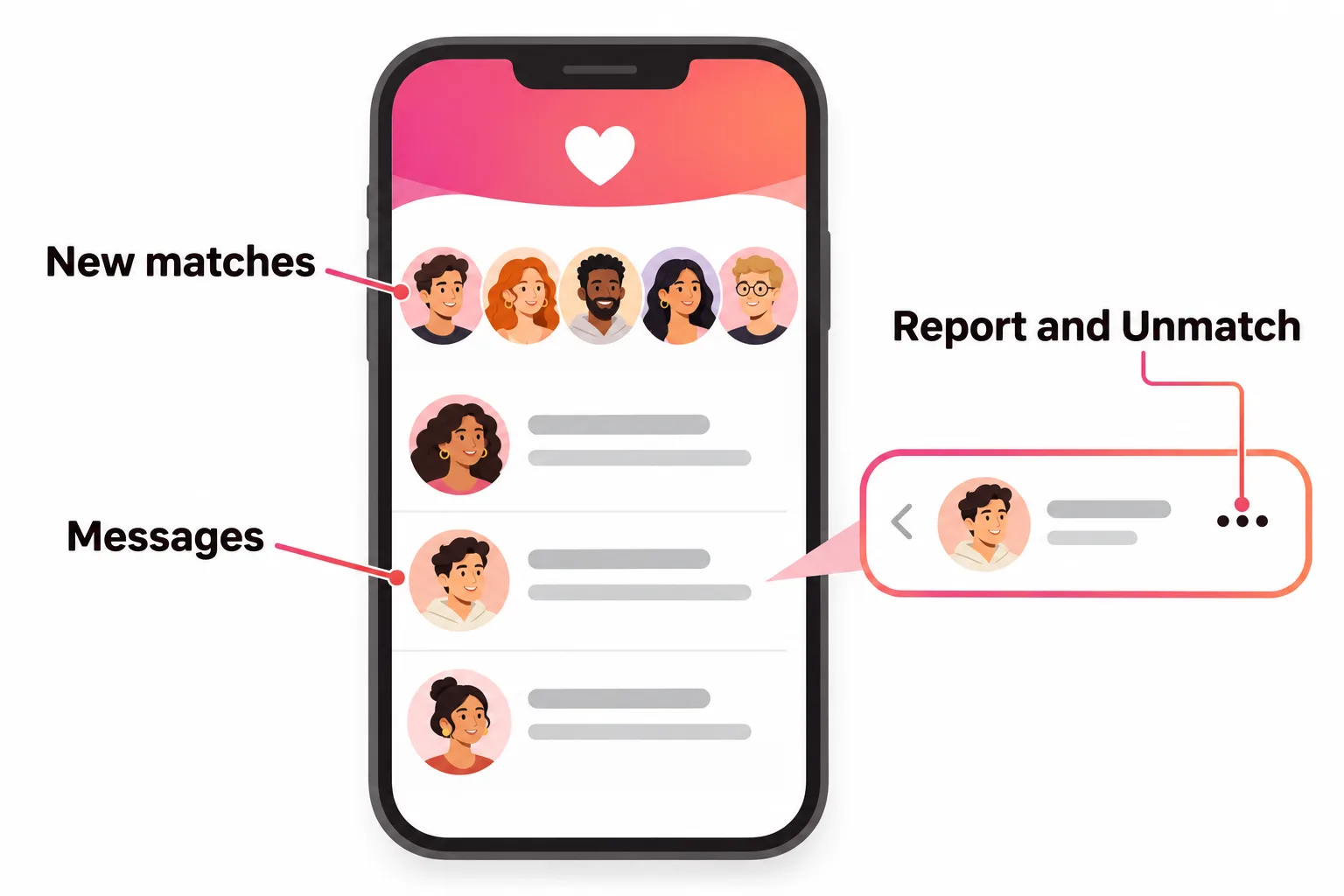
- Tap the person you want to message. New matches sit in a row at the top; conversations you've started appear in the list below.
- Type and send. Add a GIF or Bitmoji if it fits. Tinder suggests both to liven up a first message.
That's the whole flow. There's no way to message someone you haven't matched with, and Tinder says you can't search for a specific person either.
The Tinder message screen, explained
- New matches row (top): people you've matched with but haven't messaged yet.
- Messages list (below): your ongoing conversations, newest first.
- Green dot: Tinder's Recently Active indicator, shown for people who've been online in the last 24 hours (unless they've turned it off).
- Three dots inside a chat: where you'll find Report and Unmatch (and Block, where available).
- Safety shield in the match list: where Photo Verified users can change who's allowed to message them.
Who messages first on Tinder?
Anyone can. Tinder has no rule about who goes first, unlike apps built around one side making the first move. In practice, plenty of matches sit silent because both people are waiting. If you're interested, send the first message yourself, and do it soon: Tinder says it favors people who are active at the same time, and a new match is when interest is highest.
What you can and can't send in Tinder messages
| You can send | You can't |
|---|---|
| Text and emoji | Photos or videos from your camera roll |
| GIFs | Messages to people you haven't matched |
| Bitmoji |
Tinder's help center mentions GIFs and Bitmoji for chat and nothing about photo attachments. If you want someone to see more of you, put those photos on your profile. Full details in can you send pictures on Tinder.
Photo Verified Chat
If you're Photo Verified, you can choose to only receive messages from other Photo Verified people: match list, Safety Shield, Update Message Settings, then toggle on Photo Verified Chat. If you message someone who has it on and you're not verified, Tinder asks you to verify first. If that's stopping you, see Tinder photo verification.
Why did my Tinder messages disappear?
There are three different situations:
- One conversation vanished. Tinder says that person most likely unmatched you or deleted their account. You get no notice either way. More in unmatched on Tinder.
- All conversations vanished at once. Tinder says this "may be temporary". Wait, then log out and back in (profile icon, Settings, Logout).
- You unmatched someone. That deletes the whole chat for both of you, and Tinder says it "can't be reversed".
Separately, you can't delete individual messages on Tinder. Once a message is sent, it stays until one of you unmatches. If something worrying was said, take screenshots before anyone unmatches, because Tinder's email reporting asks for details and screenshots of the profile.
Tinder messages not sending
Tinder's fix:
- Check your connection by switching between Wi-Fi and mobile data.
- Delete and reinstall the app to get the latest version.
- Resend: on iPhone, tap the red exclamation mark next to the failed message; on Android, tap the message.
Other reasons messages won't go through: the person has Photo Verified Chat on, your profile is hidden (Tinder hides profiles without a detectable face photo, though existing chats keep working), or you have an unfinished age check, which blocks sending messages until it's done. For other app problems, see Tinder is not working.
Best Tinder messages: what to write
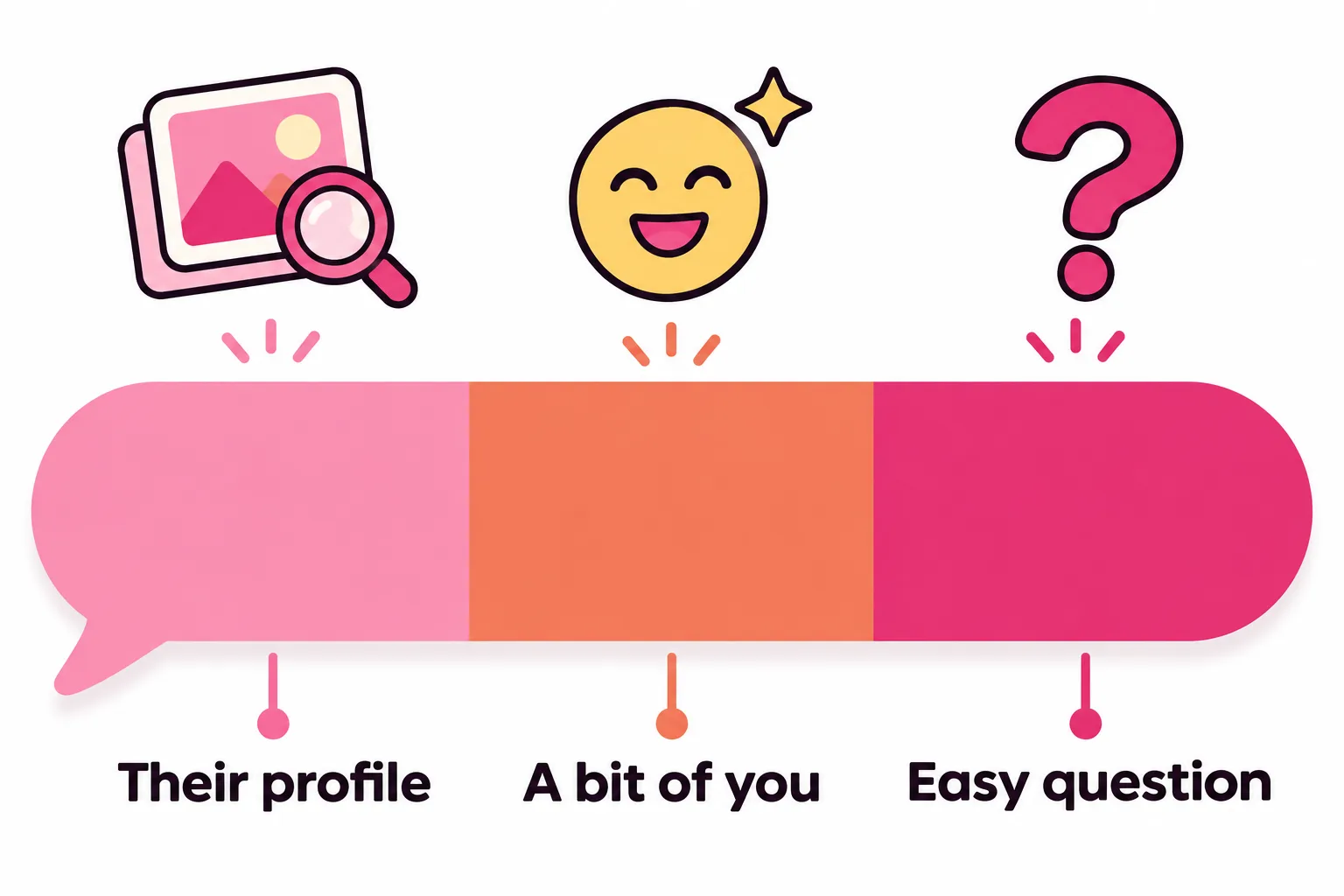
A good first message does three things: shows you read their profile, adds a little of your personality, and ends with an easy question. A few examples:
- "Your second photo: did you actually catch that fish, or is it a very proud borrow?"
- "Bio says you'll judge me by my coffee order. Cold brew, no sugar. Verdict?"
- "Is that Kyoto? I've wanted to go for years. Best thing you ate there?"
- "Settle a debate: best pizza topping that nobody admits to liking?"
What doesn't work: "hey" on its own, copy-pasted pick-up lines, comments about someone's body, and long paragraphs. We go much deeper, with 35 openers by type, in how to start a conversation on Tinder, and there are more in good Tinder openers.
Keeping a Tinder conversation going
- Answer their question, then ask one back.
- Follow up on what they mention instead of jumping topics.
- Match their message length and pace.
- After a good back-and-forth, suggest meeting. Long text-only chats tend to fade.
Stuck on what to say next? Paste the conversation into our free reply helper below for a few ideas in your own voice.



No good photos of yourself?
Turn a selfie into realistic dating photos: travel, dinner, outdoors and more. One selfie is enough. From $29, one-time.
No messages on Tinder? What to check
If you match but nobody messages you, or nobody replies:
- Are you waiting for them to go first? Most people are. Send the first message.
- Are your openers specific? "Hey" gets ignored more than anything else.
- Do you message soon after matching? Old matches go cold.
- Does your profile give people something to reply to? People open your profile before answering. A clear first photo and a bio with one specific detail make replying easy.
If the problem is earlier, with few matches to message at all, start with your photos: our guide to Tinder pictures shows what gets likes and replies.
Frequently asked questions
How do you message someone on Tinder?
Match with them first, by both liking each other. Then open your match list, tap their photo or chat, type your message and send. Tinder only lets people chat once both have shown mutual interest.
Who messages first on Tinder?
Either person. Tinder doesn't require one side to go first, so anyone in the match can start the conversation. If you want to talk, send the first message rather than waiting.
Why did my Tinder messages disappear?
If one conversation vanished, Tinder says the person most likely unmatched you or deleted their account; Tinder doesn't notify you either way. If all your chats disappeared at once, it's usually a temporary glitch, and logging out and back in usually brings them back.
Can you delete a message on Tinder?
Not individually. Tinder says you can't delete single messages; the only way to remove a conversation is to unmatch, which deletes the chat for both of you and can't be undone.
Can you send photos in Tinder messages?
No, not from your camera roll, as of November 2026. You can send text, GIFs and Bitmoji. To show someone more photos, add them to your profile.
Why can't I message some Tinder matches?
They may have Photo Verified Chat turned on, which only accepts messages from Photo Verified people; you'll be asked to verify first. Other causes are a connection problem, a hidden profile or an unfinished age check.
Why am I getting no messages on Tinder?
Most people wait for the other person to write. Send the first message yourself, make it specific to their profile, and do it soon after matching. If matches never reply, look at your photos and bio, since people check your profile before answering.
Sources
- Tinder Help Center: How do I message someone?
- Tinder Help Center: Messaging a Match
- Tinder Help Center: Can I delete a message?
- Tinder Help Center: My messages aren't sending
- Tinder Help Center: Problems with Matches
- Tinder Help Center: Unmatching someone
- Tinder Help Center: Photo Verified Chat
- Tinder Help Center: Reporting profiles and content
- Tinder Help Center: My profile is hidden
- Tinder Help Center: Recently Active
Written and reviewed by
Dating profile editor at DatingProfile
Mark writes and reviews DatingProfile’s guides to dating profiles: the photos, bios and prompts that work on Tinder, Hinge and Bumble, and how each app actually behaves.
@mark_x_997

