Dating profile photos
AI Photos That Look Real: What Makes the Difference
AI photos look real when they keep real skin texture, light that matches the scene, the slightly imperfect look of a phone camera, and the same recognizable face in every shot. They look fake when skin is airbrushed, lighting is too perfect, hands and backgrounds are warped, or the face changes from photo to photo.
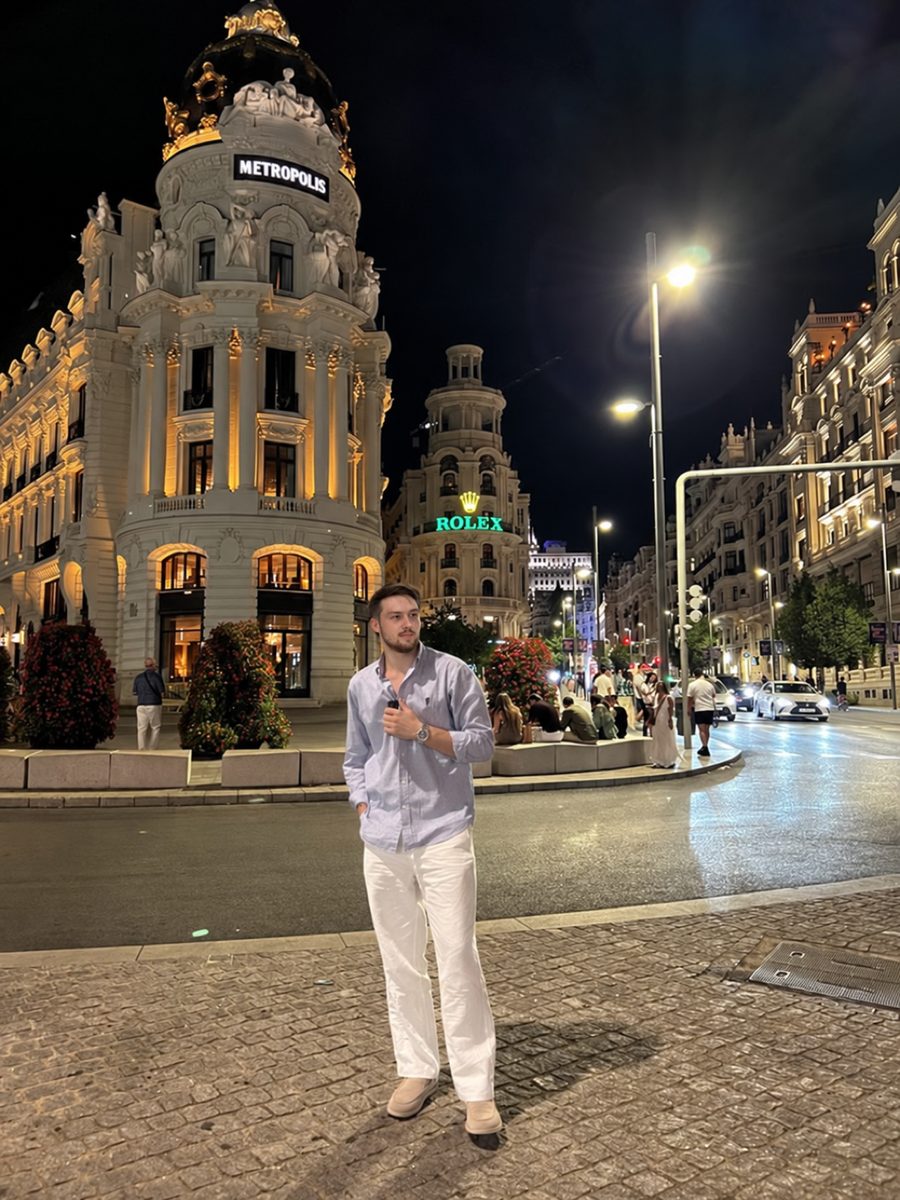
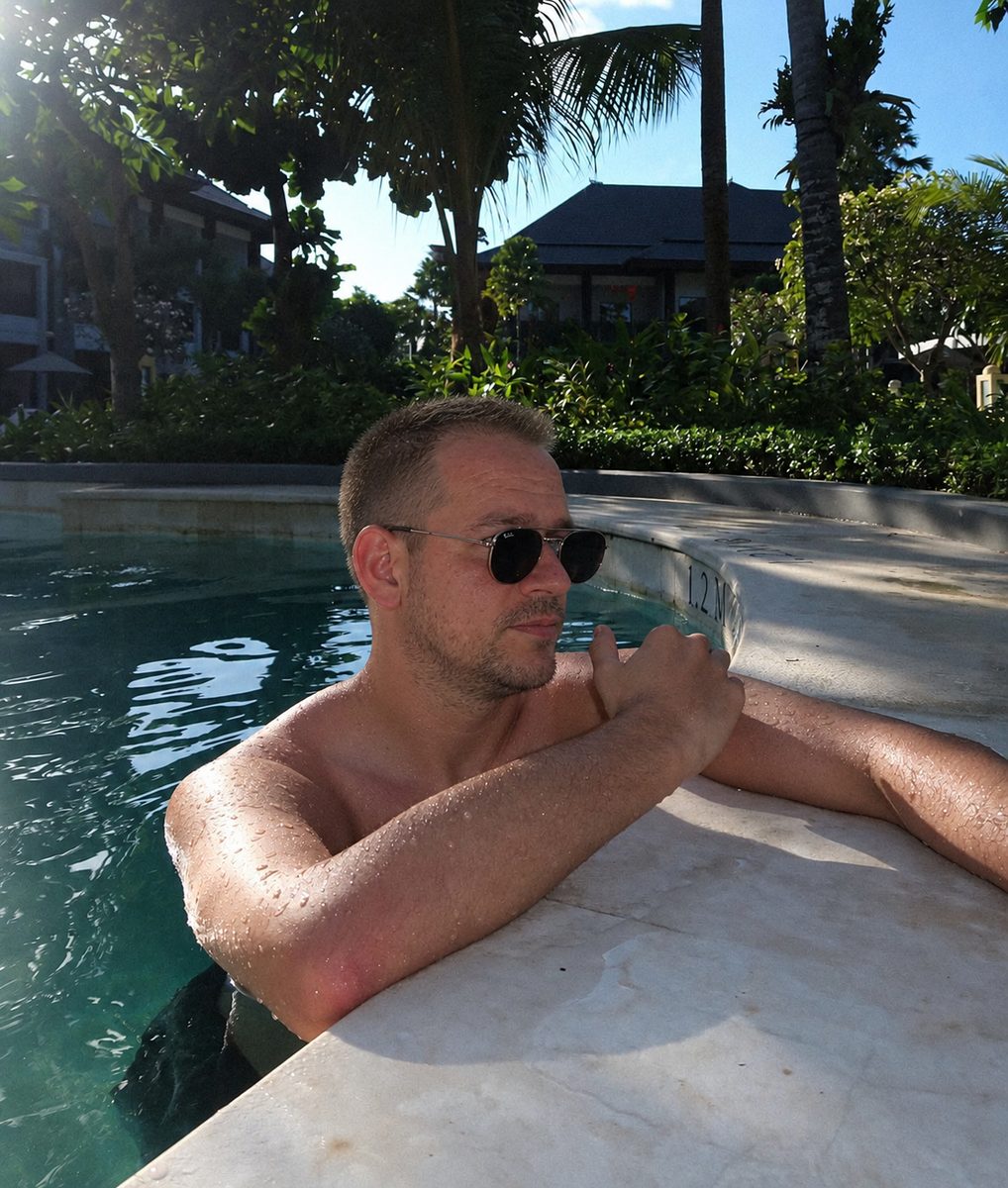


 Made with DatingProfile
AI photos that look real get four things right: skin, light, camera and face. Miss any one of them and people notice within a second, even if they can't say why. Here's what each one means, how to make AI pictures look real, and the tells to check for before you use a photo anywhere.
What makes AI photos look real
1. Real skin texture
Real skin has pores, small marks, uneven tone and a bit of shine on the nose and forehead. Many AI tools smooth all of that away because smooth skin scores as "attractive". The result is the waxy, poreless look people now recognize as AI. A believable photo keeps texture at the level a phone camera would capture: visible up close, not exaggerated.
2. Light that matches the scene
In a real photo, the light on your face comes from the same place as the light on everything else. Sun from the left means shadows to the right, on your face and on the table. Night photos are darker and grainier. AI images often light the face like a studio while the background says sunset or neon bar. That mismatch is one of the strongest tells.
3. A phone-camera look
Most dating and social photos are taken on phones. They have a slightly wide lens, everyday framing, a background that's a little busy, and natural imperfections like a cropped elbow or a stray glass on the table. AI images that look like a magazine shoot, with perfect composition and creamy background blur, look out of place on a phone screen next to real photos.
4. The same face in every shot
A person looks recognizably the same from photo to photo: same jaw, eye shape, hairline, ears and nose. Weaker AI tools drift, so you look like your cousin in one photo and a model in another. Consistency is what makes a set of photos believable, and it has a practical side: the selfie checks on dating apps look for the same face across your pictures and your camera.




How to make AI photos look real
- Start with a good selfie. Clear, recent, in daylight, face straight on, no sunglasses, no filters. The output can only be as faithful as the input.
- Add a few more angles if you can. A second or third selfie from a slightly different angle gives the model more to work with.
- Choose believable scenes. A cafe, a walk in the city, a hike, a dinner. Skip private jets and red carpets unless that's genuinely your life.
- Keep your style. Clothes you'd actually wear and your real hair. A photo that doesn't match how you show up on a date backfires.
- Reject anything that isn't you. If a friend would hesitate to recognize you, don't use it.
- Mix in real photos. A real recent photo alongside generated ones keeps your profile honest and verification simple.
How to make an AI picture look more real after it's made
If a single photo is close but slightly off, these fixes help:
| Problem | Fix |
|---|---|
| Skin too smooth | Pick a different shot; adding fake grain rarely fixes plastic skin |
| Face lit differently from the background | Choose a scene with flat, even light (shade, overcast) |
| Odd hands | Crop them out or pick a pose with hands hidden or holding something |
| Garbled text on signs or clothes | Crop it out or choose another shot |
| Too perfect, too posed | Choose the candid-looking shots in the set |
Heavy editing on top of an AI image usually makes it look more artificial, not less. Picking well beats fixing.
AI pictures that look real: the tells to check
Before using any AI photo, zoom in and check:
- Hands: the right number of fingers, nails that look like nails, natural grip on objects
- Ears and glasses: both ears match; glasses arms reach the ears
- Jewelry and collars: watches, chains and buttons that don't melt into skin or fabric
- Teeth: individual teeth, not one white strip
- Background: straight lines that stay straight, people who look like people, readable or blurry text (not nonsense letters)
- Hair edges: strands, not a smooth painted outline
For more on this, see realistic AI photos and the AI selfie generator.
Honest use on dating apps
Realistic doesn't mean misleading. Tinder's guidelines ask you to "just be you", and Match Group says profile photos must honestly represent who you are. On its page for India it goes further: synthetic images there can lead to content removal, suspension or a permanent ban. Rules differ by app and country and keep changing, so check them when you upload, keep at least one real recent photo, and only use generated photos that show your real face as it looks now. Tinder photo verification explains how the check works.
AI photos that look real, made from your selfie
DatingProfile's HyperReal™ method aims at the same four things this page checks for: skin with texture, light that belongs to the scene, an ordinary phone-camera look, and your face held steady from shot to shot. You start with one selfie (or up to 4 for an even closer match), choose everyday styles like a city night, a terrace lunch or a pool day, and get 4 takes of each to judge with the tells above. Use the ones that pass and look like you today, and follow each app's rules. Both packs are one-time payments, $29 for up to 30 photos or $49 for up to 140, with a 14-day guarantee.
Pricing
Packs and prices
Two one-time packs. Pay once: no subscription, nothing to cancel. Both are covered by the refund policy.
The Fix Pack
A quick upgrade for your profile.
$29one-time
Up to 30 photos · $0.97 per photo
Choose Fix- HyperReal™ photos in any of 62 styles
- Ready in about a minute
- Works with app photo verification
- 14-day satisfaction guarantee
The Pro Pack
The sweet spot for a full glow-up.
$49one-time
Up to 140 photos · $0.35 per photo
Choose Pro- HyperReal™ photos in any of 62 styles
- Enough for about 35 styles, 4 shots each
- Lowest price per photo
- Ready in about a minute
- Works with app photo verification
- 14-day satisfaction guarantee
DatingProfile vs a dating photographer
| Factor | DatingProfile |  Photographer |
|---|---|---|
| Cost | From $29 | $300–$500 per shoot |
| Turnaround | Under a minute per photo | Days to weeks |
| Scenes & outfits | 62 styles, 4 different shots each | Whatever fits in one shoot |
| Want more? | Buy another pack anytime | Book and pay again |
| Looks like you | Yes, made from your selfies | Yes |
Privacy: Your selfies and generated photos are never used to train AI models and are never shared or sold. Only you can see them, and you can delete them from your dashboard at any time.
Frequently asked questions
How do I make AI photos look real?
Start with a clear, recent selfie in good light, choose realistic everyday scenes, and reject any result with smooth plastic skin, warped hands or a face that doesn't look like you. Fewer, more believable photos beat a big set with some obvious fakes.
How can you tell if a photo is AI?
Look at skin, hands, text and backgrounds. Common tells are poreless skin, too many or fused fingers, garbled lettering on signs, jewelry that melts into skin, and lighting on the face that doesn't match the scene. A face that changes shape between photos is another giveaway.
Are AI photos allowed on dating apps?
Each app sets its own rules. Match Group, which owns Tinder and Hinge, says your photos must honestly represent who you are, and its policy page for India warns that synthetic images can lead to removal, suspension or a ban. Use only photos that keep your real face and look like you now, and check each app's current rules.
Should I mix real photos with AI photos?
Yes, and it also matters for verification, which nobody can guarantee an AI photo will pass. Tinder matches your live face against your profile pictures, so anything that drifts from how you really look is likely to fail. A real, recent face photo in the set gives the check something reliable to match.
Why do my AI pictures look fake?
Often because the tool is tuned to make people look attractive rather than real. That means smoothed skin, studio light and model-perfect poses. Results also look fake when the input selfie was dark, filtered or taken at an odd angle.
Sources
Keep reading
More photo guides
- Tinder PicturesLead with a clear, smiling solo face photo, then add full body, a hobby, a social shot and a place.See the guide
- Dating Profile PicturesFour to six recent, well-lit photos: a clear face shot, full body, two or three real activities, nothing filtered.See the guide
- Dating App PhotosOne set of four to six clear, varied photos works on Tinder, Hinge and Bumble; only the counts and tools differ.See the guide
- Hinge PhotosHinge needs four to six photos; make each one easy to comment on, starting with a clear, smiling solo shot.See the guide
- AI Selfie GeneratorIt turns one selfie into new photos of you; pick one that keeps your face consistent and never trains on your photos.See the guide
- Tinder Dog PicsPut your own dog in photo two or three, with your face clearly visible, never as your lead photo.See the guide
Better photos, more matches
Turn one selfie into dating profile pictures
Hyperrealistic photos of you for Tinder, Hinge and Bumble, about a minute per photo. From $29, one-time.
Create my photos